

Muluwin Login: Sign In With Password or OTP
Quick answer: To log in to Muluwin, go to muluwingames.com, enter your registered mobile number or username, then sign in with either your password or a one-time OTP sent to your phone. No password reset is required to switch between the two methods on the same account.
What does the Muluwin login screen ask for?
The Muluwin login screen asks for just two things: your Mobile Number or Username, and either your Password or a one-time code through Login with OTP. A Forgot Password? link sits below the fields for accounts that need a reset. This is the same screen every returning player uses, whether they’re checking their wallet, claiming a bonus, or jumping into a game.
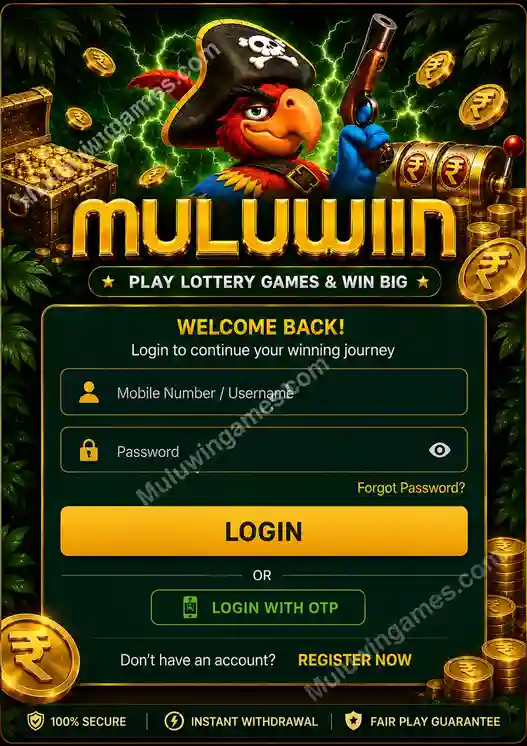
The Muluwin login screen with password and OTP options.
How do I log in to Muluwin with a password?
- Open muluwingames.com in your browser or from your home screen shortcut.
- Enter your registered mobile number or username in the login field.
- Type your account password.
- Tap the login button to reach your dashboard and wallet.
How do I log in to Muluwin with OTP instead?
- On the login screen, select Login with OTP instead of entering a password.
- Enter your registered mobile number.
- Wait for the one-time code sent by SMS, then enter it on the screen.
- You’re logged in instantly — no password needed for this session.
Password login or OTP login — which should I use?
| Login method | Best for | Requires |
|---|---|---|
| Password login | Fast, repeat sign-ins on a trusted personal device | A remembered password |
| OTP login | Forgotten passwords, or logging in from a new device | Access to your registered mobile number |
What if I can’t log in to Muluwin?
Most login problems fall into one of three cases, each with its own fix:
- Forgot your password: tap Forgot Password? on the login screen and reset it through your registered mobile number, or switch to Login with OTP instead.
- OTP not arriving: double-check the mobile number you entered matches your registered number, then request the code again after a short wait.
- Login field not accepted: confirm you’re on the official muluwingames.com domain and not a bookmarked or forwarded link that may be outdated.
How do I keep my Muluwin login secure?
- Never share your password or OTP with anyone, including messages claiming to be Muluwin support
- Log out of your account after playing on a shared or public device
- Recheck the browser address bar reads muluwingames.com before entering login details
- Use OTP login if you ever suspect your password may be compromised
Frequently Asked Questions
What happens if I forget my Muluwin password?
Use the Forgot Password? link on the login screen to reset it, or log in with OTP instead using your registered mobile number.
What if I don’t receive my Muluwin OTP?
Confirm the mobile number entered matches your registered number, wait a moment for network delay, and request the OTP again if it still hasn’t arrived.
Can I log in to Muluwin from more than one device?
Yes, you can log in to the same Muluwin account from different devices using your mobile number or username with either password or OTP.
Is it safe to log in to Muluwin on public Wi-Fi?
It’s safer to use OTP login on unfamiliar networks, and always log out afterward so your session doesn’t stay active on a shared connection.
Can I change my registered mobile number?
Contact official Muluwin support from inside your account for help updating your registered mobile number.
Do I need to log in every time I visit Muluwin login?
If you add Muluwin to your phone’s home screen, your session may stay active between visits, though logging out manually will always require signing back in with your password or OTP.
Key Aspects of Muluwin login
- Log in with your mobile number or username, then either your password or an OTP
- OTP login works well when you’ve forgotten your password or you’re on a new device
- Forgot Password? resets your account without needing OTP first
- Always confirm you’re on muluwingames.com before entering login details
Don’t have an account yet? You can create a Muluwin account in a few steps before your first login.
Muluwin accounts are intended for adults aged 18 and above. Real-money gaming laws vary by state in India and can change; players are responsible for confirming legality in their own region. Please play responsibly and treat gameplay as entertainment rather than a source of guaranteed income.