

Muluwin Withdraw: How to Cash Out Your Winnings
Quick answer: A Muluwin withdrawal is requested from the Wallet tab by selecting UPI, PhonePe, Paytm, or Bank Transfer, entering your UPI ID or bank details, choosing an amount, and submitting. Withdrawals are built around Instant Processing, so requests are designed to move without long manual delays.
What is a Muluwin withdrawal?
A Muluwin withdrawal is the process of moving money out of your wallet balance and into your own bank account or UPI-linked app. It’s the reverse of a deposit — instead of adding funds, you’re cashing out winnings or unused balance, and the withdrawal screen itself carries the headline “Withdraw Your Winnings.”
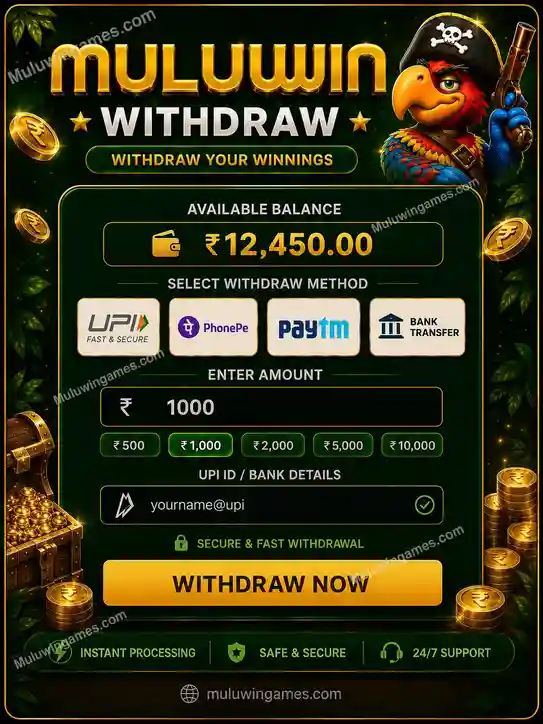
The Muluwin withdrawal screen showing available balance and payout methods.
How do I request a withdrawal on Muluwin?
- Open the Wallet tab and tap “Withdraw.”
- Check your Available Balance shown at the top of the screen.
- Select a withdrawal method: UPI, PhonePe, Paytm, or Bank Transfer.
- Enter your UPI ID or bank account details accurately.
- Pick a quick amount or type a custom amount, then tap “Withdraw Now” to submit the request.
Which withdrawal method should I choose on Muluwin?
| Withdrawal method | What you’ll need | Good for |
|---|---|---|
| UPI | A valid UPI ID | Fast payouts straight to any UPI-linked account |
| PhonePe | PhonePe-linked UPI ID | Players who already deposit through PhonePe |
| Paytm | Paytm-linked UPI ID or wallet | Players who already deposit through Paytm |
| Bank Transfer | Account number and IFSC code | Players who prefer funds landing directly in a bank account |
How much can I withdraw from Muluwin at once?
The withdrawal screen offers the same quick-select amounts as deposits — ₹500, ₹1,000, ₹2,000, ₹5,000, and ₹10,000 — or a custom amount field for a different figure, as long as it’s within your current Available Balance shown on screen.
Why is my Muluwin withdrawal pending or delayed?
- Still in processing: Instant Processing is the goal, but a short delay can still happen depending on your bank or UPI provider.
- UPI ID or bank details typed incorrectly: double-check the details entered match your actual account exactly.
- Requested amount above your Available Balance: confirm your balance covers the amount before resubmitting.
- Bank or app-side maintenance: check your bank or UPI app’s own status page if the delay continues beyond a short wait.
How do I withdraw from Muluwin safely?
- Only enter your own UPI ID or bank details — never someone else’s account
- Double-check account numbers and IFSC codes before submitting a Bank Transfer request
- Keep a record of each withdrawal request until the funds appear in your account
- Withdraw only from the official Wallet tab on muluwingames.com, never through a link sent by someone else
Frequently Asked Questions
Is there a minimum amount for a Muluwin withdrawal?
The lowest quick-select amount shown on the withdrawal screen is ₹500, the same starting point as deposits.
Can I withdraw to a different UPI ID than the one I deposited from?
The withdrawal screen lets you enter a UPI ID at the time of the request; using the same verified account you normally use is the safest approach.
How long does a Muluwin withdrawal take?
Withdrawals are built around Instant Processing, though actual timing can still depend on your bank or UPI provider’s own processing speed.
Can I cancel a withdrawal after submitting it?
Once a Muluwin withdrawal request is submitted, it moves into processing on Muluwin’s side and can’t be edited from the withdrawal screen itself.
Is Bank Transfer slower than UPI for withdrawals?
Specific timing differences between methods aren’t confirmed here; both are listed as supported withdrawal options on the same screen.
What if I entered the wrong bank details on my withdrawal?
Contact official Muluwin support from inside your account as soon as possible if you notice incorrect details after submitting a request.
Key takeaways
- Withdrawals are requested from the Wallet tab using UPI, PhonePe, Paytm, or Bank Transfer
- Quick amounts match deposits, from ₹500 up to ₹10,000, or a custom figure within your Available Balance
- Withdrawals are designed around Instant Processing, though bank-side timing can still vary
- Always double-check UPI ID or bank details before submitting a withdrawal request
Haven’t added funds yet? Check the Muluwin deposit page to fund your wallet before requesting a withdrawal.
Muluwin is intended for adults aged 18 and above. Real-money gaming laws vary by state in India and can change; players are responsible for confirming legality in their own region. Please play responsibly and treat gameplay as entertainment rather than a source of guaranteed income.